Web console
ksync console serves a read-only web console for people who need to see Kuvryn Sync state without a kubeconfig or the CLI:
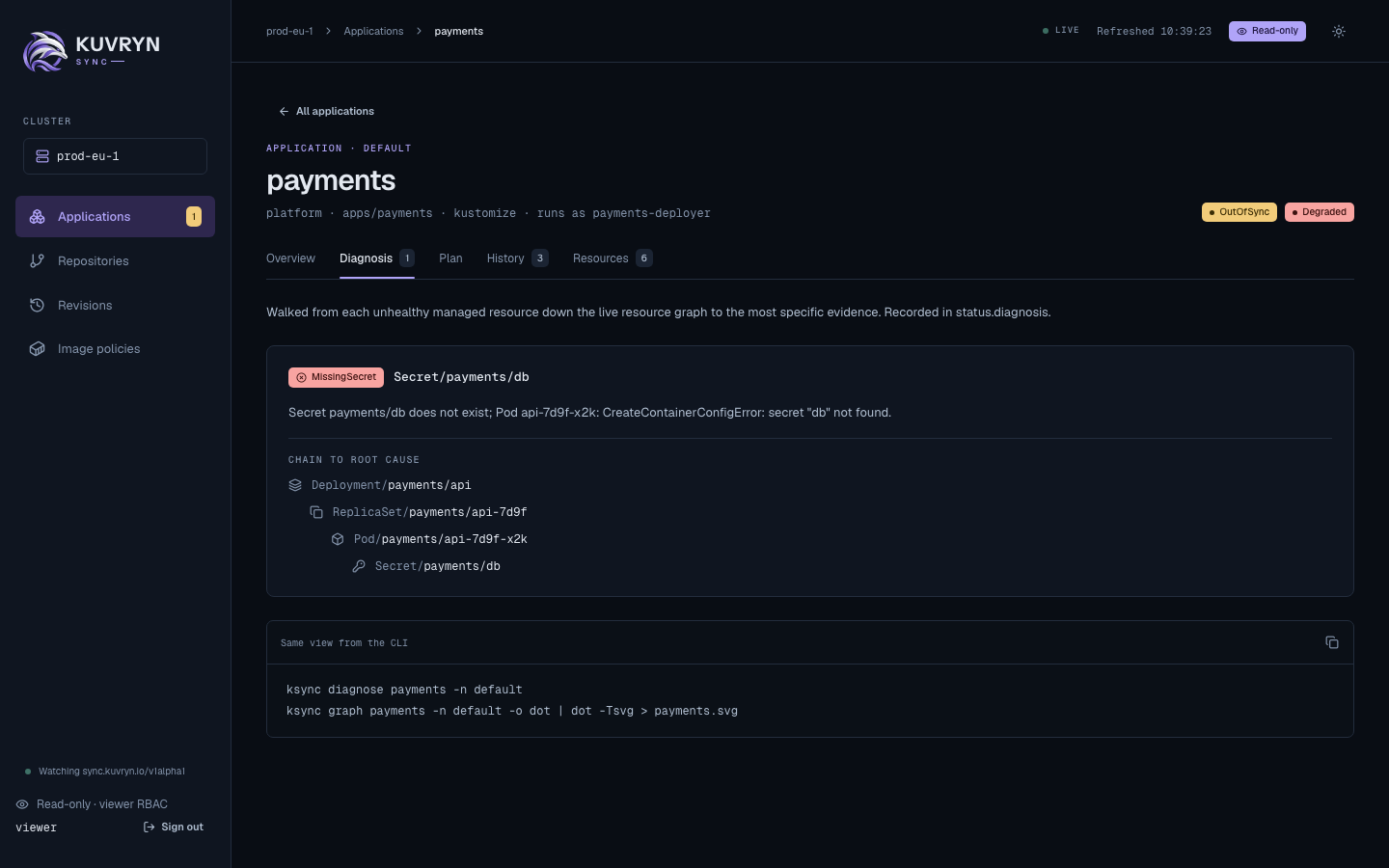
- application teams checking why an Application is Degraded;
- approvers reading a plan before approving it with
ksync sync; - auditors reading Revisions;
- on-call staff scanning what is drifted or awaiting approval.
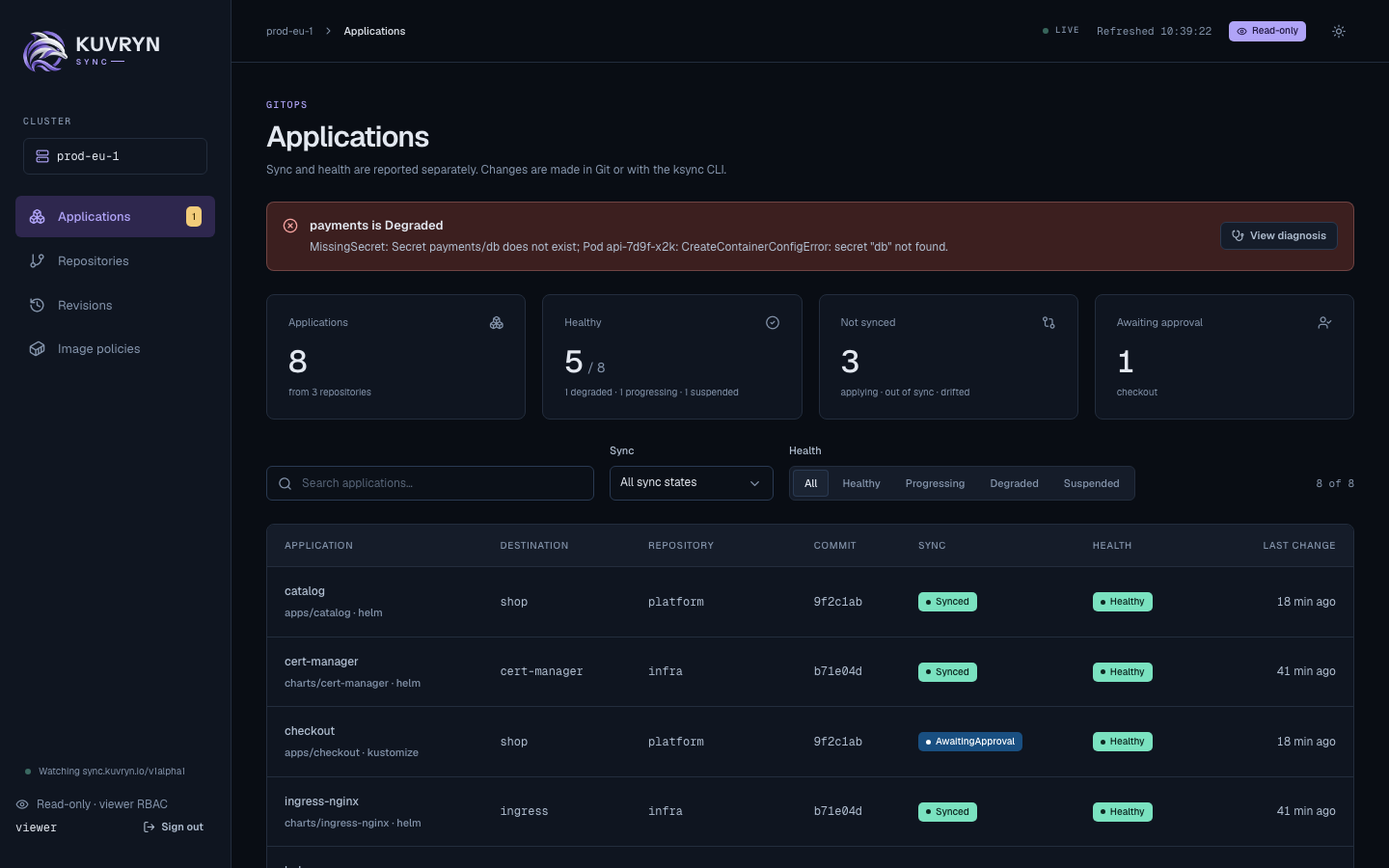
It shows Applications with their diagnosis chain, plan, history and managed resources, and the Repositories, Revisions and Image policies tables. The pages refresh every 10 seconds. The console never changes the cluster: where an action is needed, it shows the exact ksync command instead.
Filter the tables
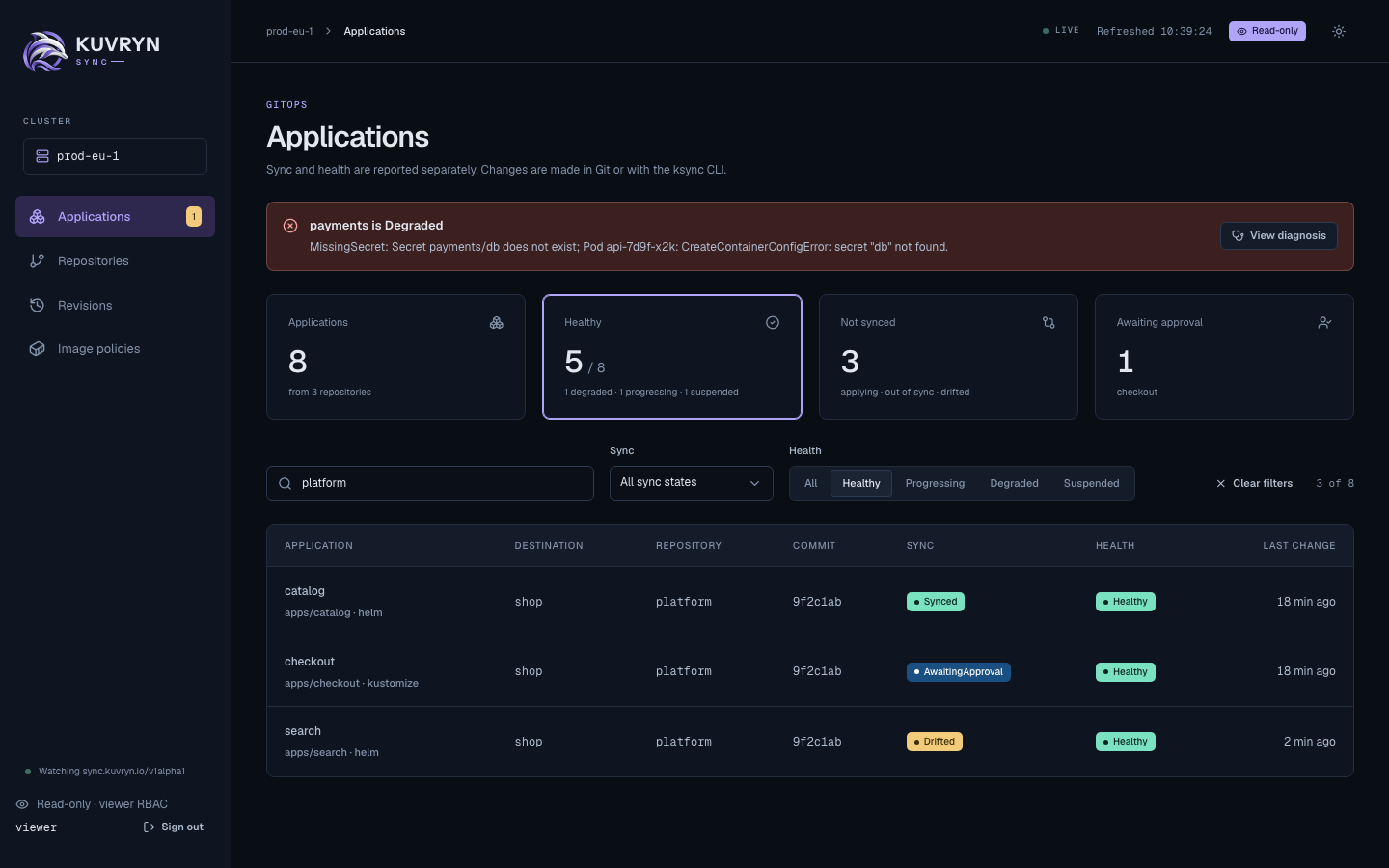
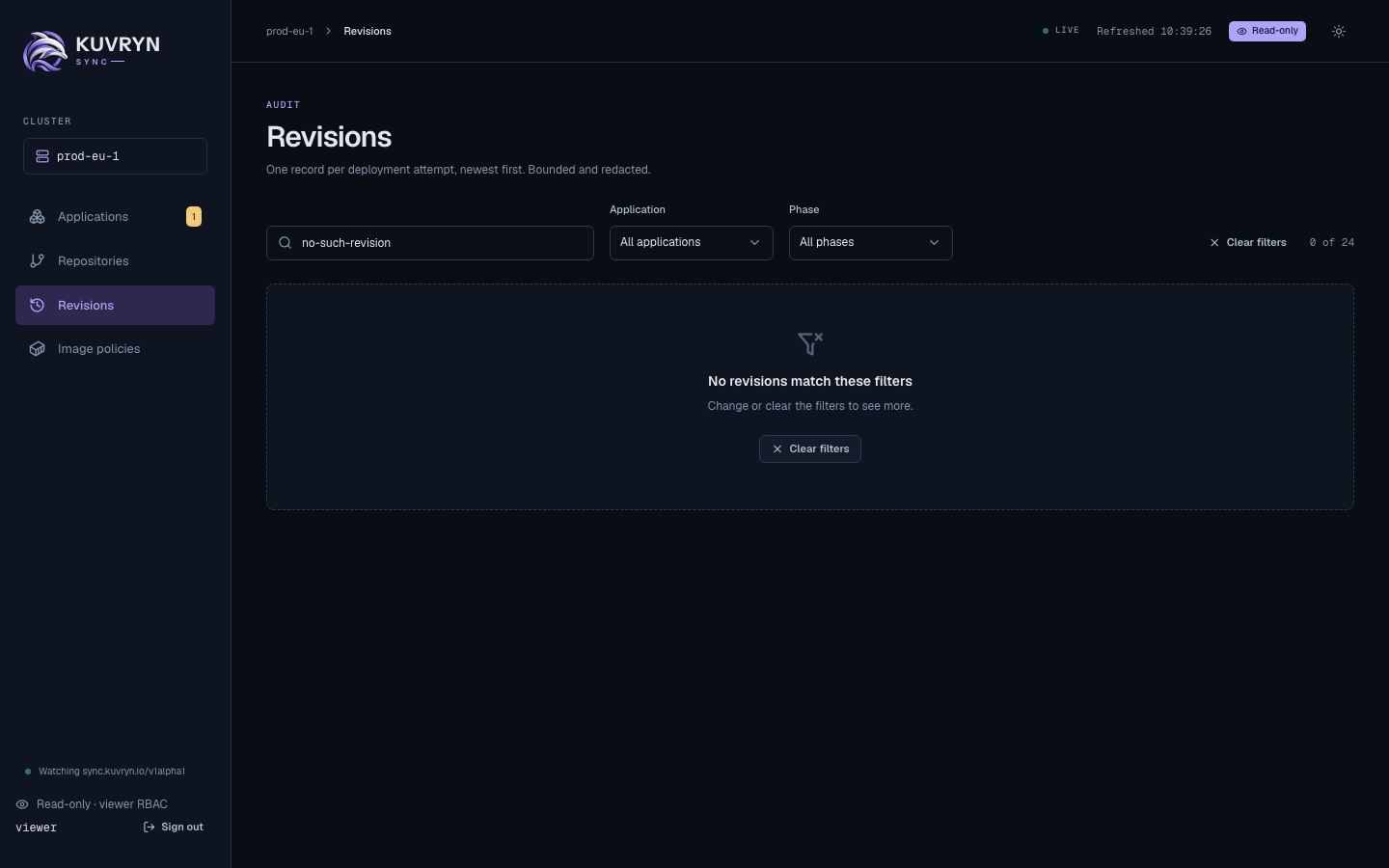
Each table has filters above it: a search box, and the states present in the rows, such as Sync and Health on Applications, Application and Phase on Revisions, State on Repositories, and Kind with “Only not synced or unhealthy” on an Application’s resources. The “Healthy”, “Not synced” and “Awaiting approval” cards set the matching filter. Filters narrow the rows the page already has, show “N of M”, and live in the URL, for example /apps?q=platform&health=Healthy, so they survive a reload and Back and a link shares them. They work with the chosen namespace.
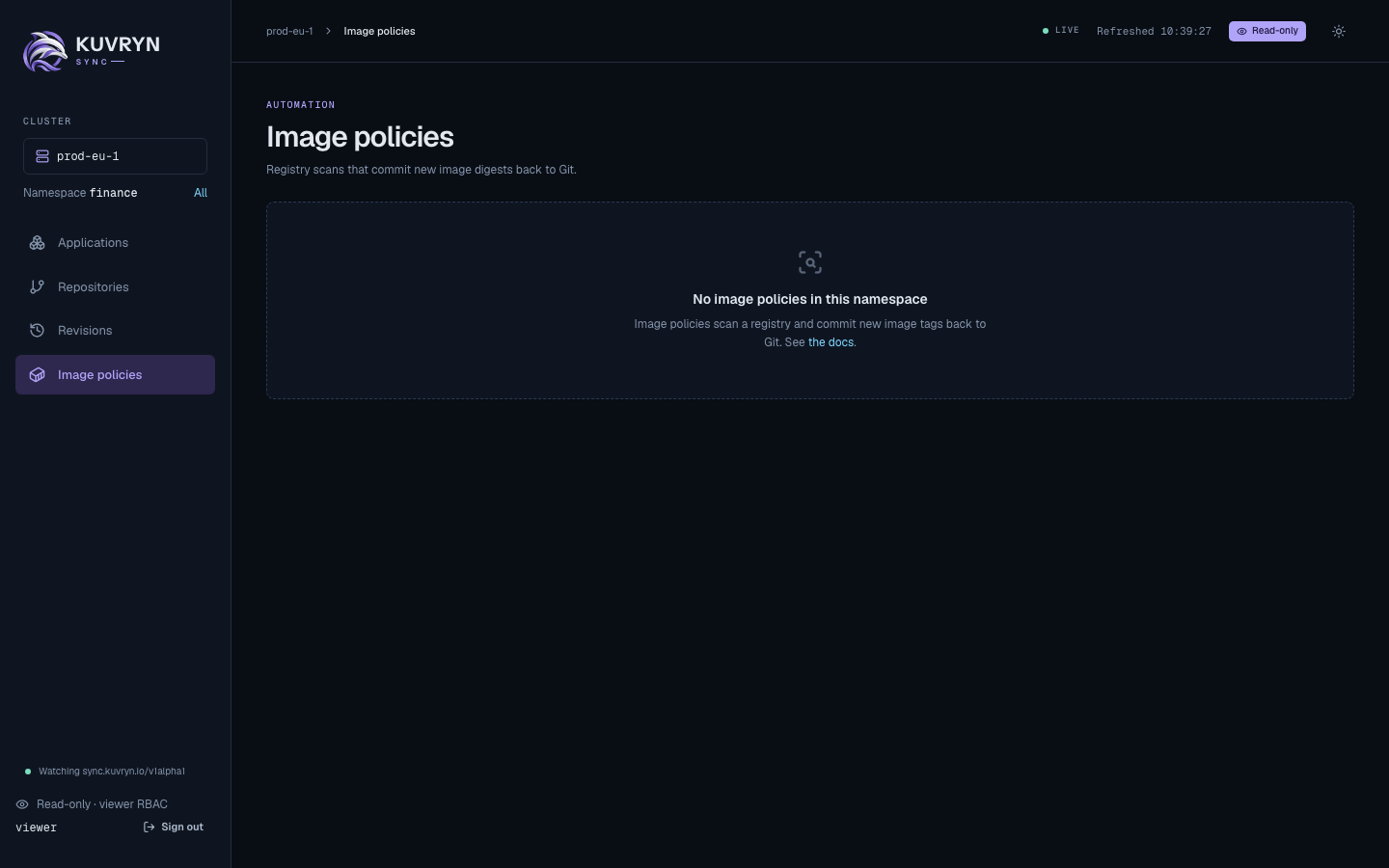
A table with nothing in it at all, such as Image policies in a namespace without any, says what those objects are and links to the docs instead of showing empty filters.
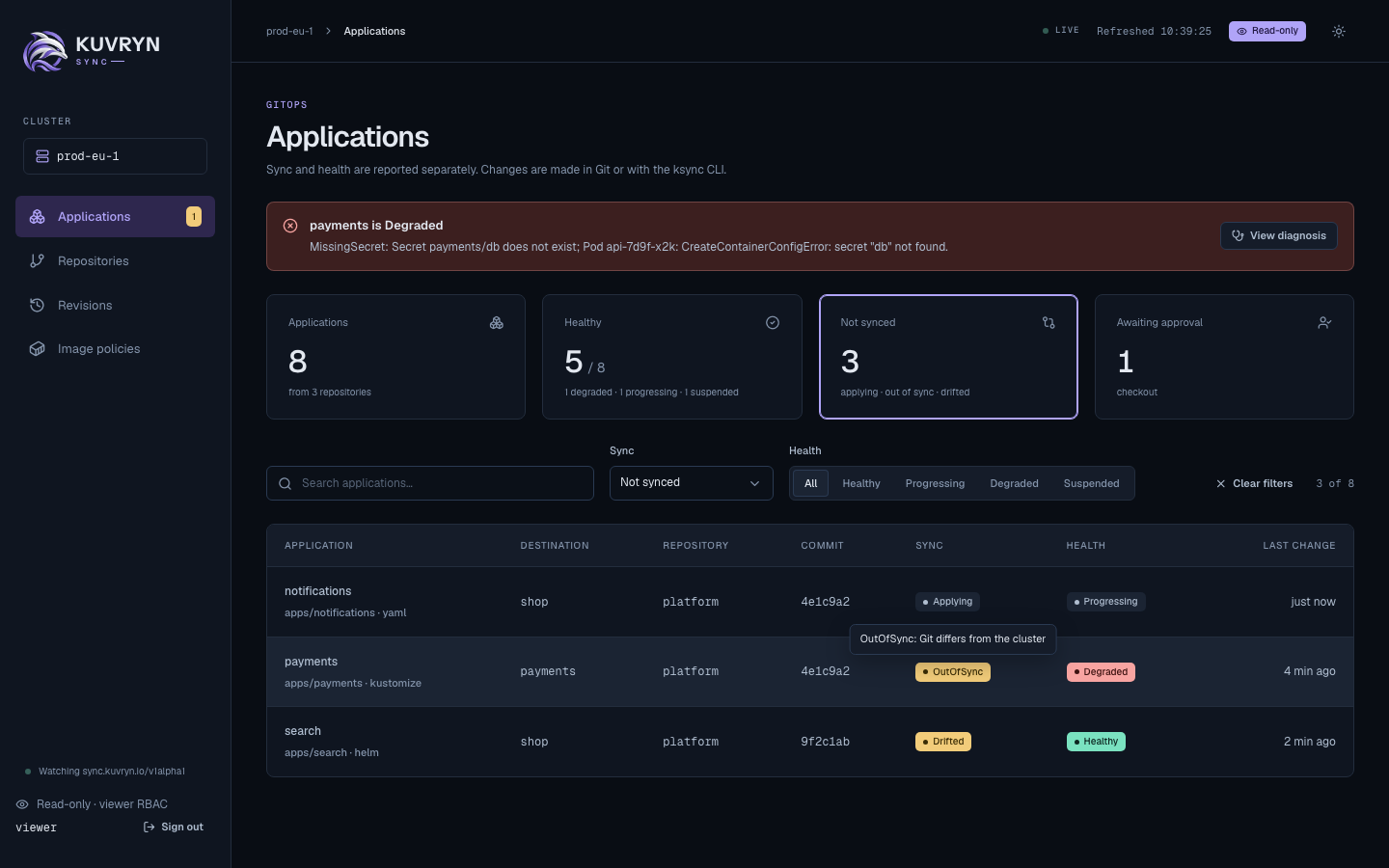
Tooltips explain what the console abbreviates, on hover and on keyboard focus: each Sync and Health state, the absolute local time behind “4 min ago”, full commit SHAs, digests, long paths and URLs, the signed-in username, and what each stat card counts. “Last change” is when an Application’s newest Revision started or finished, or a condition changed, whichever is latest.
How access works
The console has no permission model of its own. People sign in, and every read is made with their own Kubernetes identity, so RBAC decides what each person sees and the API server’s audit log records the reads under their name. There are two ways to sign in:
- A Kubernetes token, always available and the default. It works on any cluster, with nothing to install: an operator mints a token, for example with
kubectl create token, and the person pastes it on the login page. The console’s own ServiceAccount then needs no permissions at all. - OIDC, optional, for clusters that already have single sign-on such as Dex. It appears next to the token form once
console.oidc.issuerURLandconsole.oidc.clientIDare set. See Set up OIDC sign-in with Dex.
Either way, the console’s client sends only GET requests, never reads Secrets, and refuses subresources such as logs and exec. The console runs as its own Deployment and ServiceAccount, and never shares the controller’s credentials.
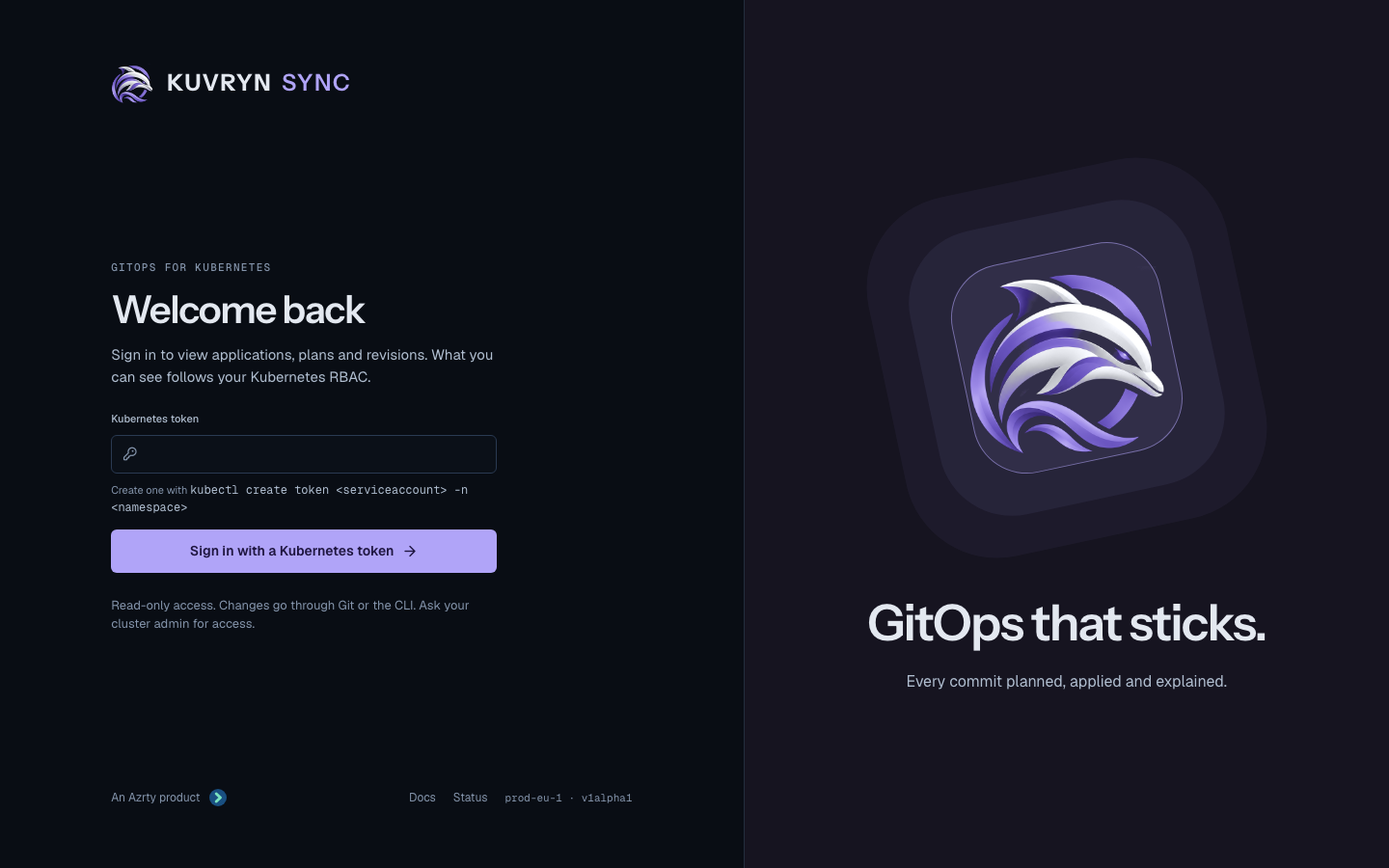
Sign in with a Kubernetes token
The login page always shows a Kubernetes token field. The form posts the token in the request body to POST /auth/token; it never goes in a URL.
- The console trims surrounding whitespace and a
Bearerprefix, and refuses a token larger than 16 KiB, and a JWT whoseexphas already passed, before sending anything. - It asks the API server who the token belongs to, with an
authentication.k8s.io/v1SelfSubjectReview sent with that token. That needs Kubernetes 1.28 or later. The request carries only the token: none of the console’s own credentials, and no impersonation. It times out after 10 seconds. - It refuses
system:anonymous, anyone insystem:unauthenticated, andsystem:users other than ServiceAccounts. ServiceAccount tokens are accepted, since the token is used as it is and nothing is impersonated. - It seals the token, with the username and groups, into the encrypted session cookie (
ksync_session, AES-256-GCM, HttpOnly, Secure, SameSite=Lax). Nothing is stored on the server, and the token is never logged or returned by any API.
The session ends at the token’s own expiry when it is a JWT, and at most 8 hours after sign-in, whichever comes first. A token that expires or is revoked earlier makes the next read fail with 401, and the console then clears the session and returns to the login page. Signing out clears the console’s session only; it does not revoke the token.
Every read in a token session carries the token as its bearer token, so the console sees exactly what the token’s RBAC allows, and the audit log names the token’s user. The console never falls back to its own ServiceAccount.
Create a viewer token
The built-in view ClusterRole does not cover Kuvryn Sync’s resources, and the per-kind kuvryn-sync-*-viewer-role ClusterRoles in dist/install.yaml do not aggregate into it; the chart does not install them at all. Give viewers the kuvryn-sync-viewer ClusterRole from Grant viewers access, which reads the sync.kuvryn.io resources and the common kinds the Resources tab shows.
To let someone see the Applications in team-a, create a ServiceAccount there and bind it to that ClusterRole with a RoleBinding, which grants it in team-a only:
apiVersion: v1
kind: ServiceAccount
metadata:
  name: console-viewer
  namespace: team-a
---
apiVersion: rbac.authorization.k8s.io/v1
kind: RoleBinding
metadata:
  name: console-viewer
  namespace: team-a
roleRef:
  apiGroup: rbac.authorization.k8s.io
  kind: ClusterRole
  name: kuvryn-sync-viewer
subjects:
  - kind: ServiceAccount
    name: console-viewer
    namespace: team-a
Then mint a token and hand it over:
kubectl create token console-viewer -n team-a --duration=8h
A console session never lasts longer than 8 hours, whatever the token’s duration, and the API server may cap --duration lower. The person signs in with the token, picks team-a in the namespace picker, and sees what the RoleBinding allows. For a viewer of every namespace, bind the ClusterRole with a ClusterRoleBinding instead. Anyone holding the token can read what it can, so share it like a password, keep durations short, and delete the ServiceAccount to revoke every token minted for it.
Install the console with the chart
With no OIDC values the chart renders a token-only console:
helm upgrade --install kuvryn-sync charts/kuvryn-sync \
  --namespace kuvryn-sync-system \
  --set console.enabled=true --set console.clusterName=prod-eu-1
kubectl -n kuvryn-sync-system rollout status deployment/kuvryn-sync-kuvryn-sync-console
The chart creates, all named <release>-kuvryn-sync-console:
- the Deployment, running
ksync consoleas non-root with a read-only root filesystem; - its ServiceAccount, which has no permissions in a token-only console;
- a Service on port 80;
- the optional Ingress (
console.ingress); - with OIDC only, a ClusterRole and ClusterRoleBinding that grant
impersonateonusersandgroups.
The console’s cookies are Secure, so serve it over TLS, for example with console.ingress and a TLS Secret. To try it without an ingress, forward the Service and open http://localhost:8080; browsers treat localhost as a secure origin, and Chrome and Firefox keep the Secure cookie there:
kubectl -n kuvryn-sync-system port-forward svc/kuvryn-sync-kuvryn-sync-console 8080:80
Without console.sessionKey.secretName the console keeps a random session key in memory, so a restart signs everyone out; see Create the Secrets for a key that lasts.
Add the console to a raw-manifest install
The raw install, dist/install.yaml, does not include the console. Render the chart’s console template on its own and apply it next to it, from a checkout of the same release tag, so the image matches the controller:
helm template kuvryn-sync charts/kuvryn-sync --namespace kuvryn-sync-system \
  --set console.enabled=true --set console.clusterName=prod-eu-1 \
  --show-only templates/console.yaml | kubectl apply -n kuvryn-sync-system -f -
The rendered objects carry no namespace of their own, so keep the -n on kubectl apply; without it they land in the current namespace, usually default.
That is the token-only console: a ServiceAccount, a Deployment and a Service in kuvryn-sync-system, and nothing cluster-wide. Add --set console.ingress.enabled=true --set console.ingress.host=... for an Ingress, --set image.pullSecrets[0]=<secret> for a private image, or the OIDC values from Install with OIDC for single sign-on. Render again with the same values after upgrading, and remove it with kubectl delete -n kuvryn-sync-system -f - on the same output.
Set up OIDC sign-in with Dex
OIDC sign-in is optional and sits next to the token form. With it:
- Sign-in uses the authorization code flow with PKCE (S256), state and nonce. The ID token’s signature, issuer, audience and expiry are verified against the issuer’s keys.
-
The username comes from the ID token claim
--username-claim(defaultemail) and the groups from--groups-claim(defaultgroups). Both prefixes are empty by default, so RBAC bindings name users and groups exactly as the issuer sends them.Warning: with no prefix, the identity provider’s users and groups share one namespace with every other way into the cluster. An IdP group named like a group from client certificates, another OIDC authenticator or a cloud provider’s IAM mapping is the same group to RBAC, and so is an IdP user named like another authenticator’s user. If the cluster has other authenticators, or RBAC bindings to groups the IdP does not own, set a prefix such as
oidc:withconsole.usernamePrefixandconsole.groupsPrefix, and bind RBAC to the prefixed names (oidc:acme:platform). Also restrict the IdP to the organizations and groups that should reach the console, as the Dex examples below do. - The session cookie expires with the ID token, and no refresh token is kept, so users sign in again when it expires.
- Every read impersonates the signed-in user and their groups. The console’s ServiceAccount may only impersonate
usersandgroups, and the console refuses usernames or groups that start withsystem:.
With OIDC, the console’s ServiceAccount is as powerful as cluster-admin. Kubernetes lets a holder of
impersonateonusersandgroupsact as any user or group,system:mastersincluded. The console refusessystem:identities, but that check lives only in the console process: anyone who obtains the ServiceAccount’s token can impersonate cluster-admin directly. Treat the release namespace like a cluster-admin credential. Allow nobody but cluster admins to exec into its pods, create pods there, or read its Secrets. Where you can, list the users and groups the console may impersonate inconsole.impersonation, as shown under Restrict whom the console may impersonate. A token-only console has no such permission.
Any OIDC issuer works. This walk-through uses Dex, which the login page’s GitHub, GitLab and email buttons are designed for. Replace console.example.com and dex.example.com with your hosts.
1. Register the console as a Dex client
Add a static client whose redirect URI is the console’s /auth/callback:
# Dex config.yaml
issuer: https://dex.example.com
staticClients:
  - id: ksync
    name: Kuvryn Sync
    secret: <a long random string>
    redirectURIs:
      - https://console.example.com/auth/callback
2. Add connectors
Each connector the console offers becomes a button on the login page. Pass the connector IDs with console.connectors, and the console sends Dex’s connector_id so users skip Dex’s own chooser.
connectors:
  - type: github
    id: github
    name: GitHub
    config:
      clientID: $GITHUB_CLIENT_ID
      clientSecret: $GITHUB_CLIENT_SECRET
      redirectURI: https://dex.example.com/callback
      # Only members of these teams can sign in. Their groups arrive as
      # "acme:platform"; bind RBAC to those names.
      orgs:
        - name: acme
          teams: [platform, payments]
      teamNameField: slug
  - type: gitlab
    id: gitlab
    name: GitLab
    config:
      baseURL: https://gitlab.acme.io
      clientID: $GITLAB_CLIENT_ID
      clientSecret: $GITLAB_CLIENT_SECRET
      redirectURI: https://dex.example.com/callback
      # Only members of these GitLab groups can sign in, and only these
      # groups are sent.
      groups: [acme/platform, acme/payments]

# The local connector: "Sign in with email" on the login page. Dex hosts the
# password form, so the console never sees a password.
enablePasswordDB: true
staticPasswords:
  - email: mia.chen@acme.io
    hash: <bcrypt hash>
    username: mia
    userID: 5d5a6c52-0f6a-4b9d-9a36-2b1f4c6e1a01
Dex’s local users carry no groups, so bind RBAC to their email address.
3. Create the Secrets
The OIDC client secret, in the release namespace:
kubectl -n kuvryn-sync-system create secret generic ksync-console-oidc \
  --from-literal=client-secret='<the Dex client secret>'
The session key is 32 bytes, and token sessions use it too. Without one, the console generates a random key in memory at startup and logs that it did: every restart then signs everyone out, and replicas cannot share sessions. The chart never generates the key itself, because a random value in the chart would change on every render, and a GitOps controller rendering it would rotate the key, and sign everyone out, on every reconcile. Create it once and keep it:
head -c 32 /dev/urandom > session-key
kubectl -n kuvryn-sync-system create secret generic ksync-console-session \
  --from-file=session-key=session-key
rm session-key
Rotating the session key signs everyone out. console.replicas above 1 requires console.sessionKey.secretName; the chart refuses to render otherwise.
4. Install the console with OIDC
# console-values.yaml
console:
  enabled: true
  oidc:
    issuerURL: https://dex.example.com
    clientID: ksync
    clientSecret:
      secretName: ksync-console-oidc
      key: client-secret
  # Optional for one replica: without it, sessions end when the pod restarts.
  sessionKey:
    secretName: ksync-console-session
    key: session-key
  clusterName: prod-eu-1
  ssoName: Dex
  connectors: [github, gitlab, local]
  docsURL: https://azrtydxb.github.io/kuvryn-sync/
  ingress:
    enabled: true
    className: nginx
    host: console.example.com
    tls:
      - secretName: console-example-com-tls
        hosts: [console.example.com]
helm upgrade --install kuvryn-sync charts/kuvryn-sync \
  --namespace kuvryn-sync-system -f console-values.yaml
kubectl -n kuvryn-sync-system rollout status deployment/kuvryn-sync-kuvryn-sync-console
console.oidc.issuerURL and console.oidc.clientID go together: with only one of them the chart refuses to render. The redirect URL defaults to https://<ingress.host>/auth/callback; set console.redirectURL when the console is exposed some other way. With OIDC and neither set, the chart refuses to render. With OIDC the chart also renders the impersonate ClusterRole and ClusterRoleBinding.
Chart values
Every chart value:
| Value | Default | Meaning |
|---|---|---|
console.replicas | 1 | More than 1 needs sessionKey.secretName. |
console.enabled | false | Install the console. |
console.oidc.issuerURL | "" | OIDC issuer URL; set with clientID, or neither for tokens only. |
console.oidc.clientID | "" | OIDC client ID; set with issuerURL. |
console.oidc.clientSecret.secretName | "" | Secret with the client secret; empty for a public client. |
console.oidc.clientSecret.key | client-secret | Key in that Secret. |
console.redirectURL | from ingress | With OIDC: https://<host>/auth/callback; required without a host. |
console.usernameClaim | email | Claim impersonated as the username. |
console.groupsClaim | groups | Claim impersonated as the groups. |
console.usernamePrefix | "" | Prefix added to the username. |
console.groupsPrefix | "" | Prefix added to each group. |
console.sessionKey.secretName | "" | Secret with the 32-byte session key; empty keeps a key in memory. |
console.sessionKey.key | session-key | Key in that Secret. |
console.clusterName | cluster | Name shown in the console. |
console.ssoName | "" | Names the “Sign in with” button. |
console.connectors | [] | Dex connectors offered: github, gitlab, local. |
console.docsURL, console.statusURL | "" | Links on the login page. |
console.ingress.enabled | false | Create an Ingress. |
console.ingress.className, .host | "" | Ingress class and host. |
console.ingress.annotations, .tls | {}, [] | Ingress annotations and TLS. |
console.resources | small | Container resources. |
The same settings are ksync console flags when you run it yourself: --listen, --session-key-file, --cluster-name, --docs-url and --status-url; for OIDC, --oidc-issuer-url and --oidc-client-id, which go together, --oidc-client-secret-file, --redirect-url, --username-claim, --groups-claim, --username-prefix, --groups-prefix, --sso-name and --connectors; and, for local development over plain HTTP only, --insecure-cookies, which refuses to start unless --redirect-url (with OIDC) or --listen (without) is on localhost, 127.0.0.1 or [::1].
Restrict whom the console may impersonate
This applies with OIDC only; a token-only console impersonates nobody. By default the console’s ClusterRole may impersonate any user and any group. To limit it, list the users and groups that may use the console. Each non-empty list becomes resourceNames on its impersonate rule:
console:
  impersonation:
    users: [mia.chen@acme.io, sam.okafor@acme.io]
    groups: [acme:platform, acme:payments]
A person whose username or any of whose groups is not listed then gets Forbidden on every page, because Kubernetes checks each impersonated name. An empty list leaves that kind unrestricted; listing only users still lets the ServiceAccount impersonate any group, system:masters included, so list both to close the gap.
Grant viewers access
The console adds no permissions: a person sees what their own RBAC, or their token’s, lets them read. A viewer needs get and list on the Kuvryn Sync resources, and on the kinds their Applications manage to see the Resources tab. This ClusterRole covers the common kinds; add the others your Applications manage.
apiVersion: rbac.authorization.k8s.io/v1
kind: ClusterRole
metadata:
  name: kuvryn-sync-viewer
rules:
  - apiGroups: ["sync.kuvryn.io"]
    resources: ["*"]
    verbs: ["get", "list"]
  # Managed kinds shown on the Resources tab. Secrets are never read by the
  # console, so they need not be granted.
  - apiGroups: [""]
    resources: ["configmaps", "services", "serviceaccounts", "pods"]
    verbs: ["get", "list"]
  - apiGroups: ["apps"]
    resources: ["deployments", "statefulsets", "daemonsets"]
    verbs: ["get", "list"]
  # Lets the namespace picker list namespaces.
  - apiGroups: [""]
    resources: ["namespaces"]
    verbs: ["list"]
---
apiVersion: rbac.authorization.k8s.io/v1
kind: ClusterRoleBinding
metadata:
  name: kuvryn-sync-viewers
roleRef:
  apiGroup: rbac.authorization.k8s.io
  kind: ClusterRole
  name: kuvryn-sync-viewer
subjects:
  - apiGroup: rbac.authorization.k8s.io
    kind: Group
    name: acme:platform
For a team that should see only its own namespace, bind the same ClusterRole with a RoleBinding in that namespace instead:
kubectl -n team-a create rolebinding kuvryn-sync-viewers \
  --clusterrole=kuvryn-sync-viewer --group=acme:team-a
Troubleshooting
- “The token was not accepted”: the API server refused the token, it has expired, it is larger than 16 KiB, or it belongs to
system:anonymousor asystem:user other than a ServiceAccount. Paste the token alone, without quotes; a leadingBeareris fine.kubectl create tokenprints a fresh one. - “The console could not reach the Kubernetes API server”: the SelfSubjectReview failed or timed out. The console logs why; a cluster older than Kubernetes 1.28 does not serve SelfSubjectReview, and the log says so.
- Pages are empty or Forbidden after a token sign-in: the token signed in, but its RBAC allows nothing there. Bind it to
kuvryn-sync-vieweras in Create a viewer token. - Sent back to the login page mid-session: the token expired or was revoked, or 8 hours passed. Sign in with a fresh token.
- OIDC “Sign-in failed” right after starting: the console could not reach the issuer yet. It retries discovery every 10 seconds, and
/healthzreports"oidc":"pending"and answers 503 until it succeeds, so the pod is not Ready. Check the issuer URL and that the pod can reach it. - Sign-in fails with a missing claim: the ID token has no claim named by
console.usernameClaim. Dex sendsemailwhen theemailscope is granted; for other issuers, set the claim they do send, such aspreferred_username. A token whoseemail_verifiedis false is refused when the username claim isemail. - Sign-in fails for an admin account: usernames and groups that start with
system:are refused, so the console can never act as a cluster component or assystem:masters. Sign in with a personal account, and grant it what it should see. - Groups are missing: Dex sends groups only when the
groupsscope is granted, which the console requests whenevergroupsClaimis set, and only from connectors that provide them. Local users have none. - “Choose a namespace” appears: the person may not list the resource across the cluster, which is expected for a namespace-scoped viewer. The picker lists the namespaces they may list, or asks them to type one when they may not list namespaces. The choice is kept in the browser.
- Rows read “not visible with your permissions”: the person may not list that kind in the destination namespace. Secrets always read that way, because the console never reads them.
- Every page is Forbidden for OIDC users: the console’s ServiceAccount cannot impersonate. At startup it checks this with SelfSubjectAccessReviews, logs the result, and
/healthzreports"impersonation":"missing". Check the<release>-kuvryn-sync-consoleClusterRoleBinding. Without OIDC it checks nothing and reports"impersonation":"disabled". - Signed out after an upgrade or restart: the session key changed, or the console generated one in memory because
console.sessionKey.secretNameis not set. Keep it in a Secret you manage if restarts and upgrades must not sign people out.
Build and develop
The console UI is a React app under web/, built into the Go binary. Release images always include it; a binary built without it serves a page explaining how to build it.
make web-build        # needs Node 22
make test-ui          # Playwright against hack/console-dev
go run ./hack/console-dev
hack/console-dev serves the console on http://127.0.0.1:5174 against a local envtest API server with sample data. Without a session it signs you in as a stub viewer; go run ./hack/console-dev token prints a token for the default/console-viewer ServiceAccount to try token sign-in with.